
Get Access to a Fully Automated
Forex System for FREE
Build a retirement fund on autopilot — even with zero experience in trading.
Takes less than 2 minutes · No payment required
🎁 We Give Back to Our Members
We've given away cars, tablets, smart watches, and $1,000 cash to our members. Monthly giveaways are still ongoing — every qualified member is eligible.
💬 What Our Members Say
Real screenshots from real members. ← swipe →
🌍 Our Impact & Community
Free medical missions, live seminars with free lunch, and a community-owned ambulance. This is more than trading — it's a movement.
🏆 Top Performing Forex Community in Asia



🚑 EA Nation — Community Ambulance
👤 Who You'll Be Working With
These admins will set up your EA, walk you through the process, and be your go-to whenever you need help.


Takes less than 2 minutes · No payment required
⚠️ Risk Disclosure
Forex trading involves significant risk of loss. Past performance does not guarantee future results. Only trade with funds you can afford to lose. EA Nation does not provide financial advice.
Quick Qualification
This takes less than 2 minutes. Answer honestly — it helps us guide you better.
One Important Question
Retirement EA is provided completely free to qualified traders — but it is only for those who are serious about building a long-term system.
Are you willing to follow a structured system and commit to this long-term?
That's okay.
Retirement EA is only for traders who are ready to commit to a long-term system.
When you're ready, come back and we'll be here. 🙏
💬 If you have questions about forex trading or EA Nation before you decide, feel free to message us on Messenger — we're happy to help.
Step 1: Create Your EA Nation Trading Account
✅ Registration is 100% free and takes about 5 minutes.
⚠️ Important: You must register through the EA Nation link below.
Accounts registered directly or through any other link will not be supported and cannot receive the EA.
Your funds will always remain in your own personal trading account.
Follow these steps:
Open the EA Nation Registration Page
Tap the button below to open the registration form. You must use this link — do not register directly on the broker's website.
Create your VT Markets account
Fill in your email and create a password. Leave the referrer/promo code field BLANK.
Fill out your personal details
Enter your full name, phone number, and country of residence.
Click Next → Account Configuration
Proceed to the account setup page.
Select MetaTrader 5 (MT5)
Under "Trading Platform", choose MetaTrader 5.
Select Cent STP Account (Swap Free)
Under "Account Type", select Cent STP (Swap Free).
Select USC as your currency
Under "Account Currency", choose USC (US Cent).
Set your account leverage
Under "Leverage", select 1:500 or 1:1000. This is required for the EA to work correctly.
Create your MT5 trading password
This is separate from your login password. You will share this with EA Nation later — do not reuse your login password.
Click Submit
Review your details and submit your application.
Complete account verification
Upload a valid Philippine ID and confirm your phone/email. You will receive a verification email — check your inbox (and spam folder).
💡 Tip: For faster verification, contact live chat support directly after submitting.
Fund Your Account
🔒 Your money goes directly into your personal VT Markets account. EA Nation never holds or touches your funds. You are in full control at all times.
💡 The higher your balance, the safer and more protected your account.
How to deposit:
Log in to your VT Markets dashboard
Go to vtmarkets.com and sign in to your account.
Click "Deposit"
Find the Deposit button on your dashboard.
Enter your deposit amount
Minimum $500. The higher your deposit, the safer your account.
Choose your payment method
Available options: GCash, BDO, BPI, UnionBank, DragonPay
Click Continue
You will be redirected to complete the payment.
Complete the payment & save your reference number
After payment, save the reference number from the confirmation screen.
📌 Note: The receiver name may vary — this is normal. Wait for funds to reflect in your VT Markets dashboard (usually within a few hours).
Step 2: Download & Log Into MT5
📱 MT5 is the app where you'll monitor your trades and where EA Nation will install your EA. Download and log in now — you'll need this ready before we activate your EA.
Follow these steps:
Download MetaTrader 5
iPhone: Search "MetaTrader 5" on the App Store → tap Get
Android: Search "MetaTrader 5" on Google Play → tap Install
Open the app and tap the person icon
In the top-right corner, tap the profile icon → Add Account.
Search for your broker
Type VT Markets in the search bar, then select VT Markets (Pty) Ltd.
Select your server
Your server name will be in the email VT Markets sent you after registration. Select the matching server from the list.
Enter your account number and password
Your MT5 Account Number and MT5 Trading Password are also in that email.
⚠️ Use your MT5 trading password — NOT your VT Markets website login password.
Tap Sign In
You should see your account balance appear. If your deposit has already cleared, your balance will show your funded amount.
💡 Balance showing 0 or can't log in? Double-check your MT5 Account Number and Server Name — both are visible in your VT Markets dashboard → My Accounts. Your deposit may also still be processing (usually a few hours).
What is Retirement EA?
Watch this short video to understand exactly how Retirement EA works — and why it works.
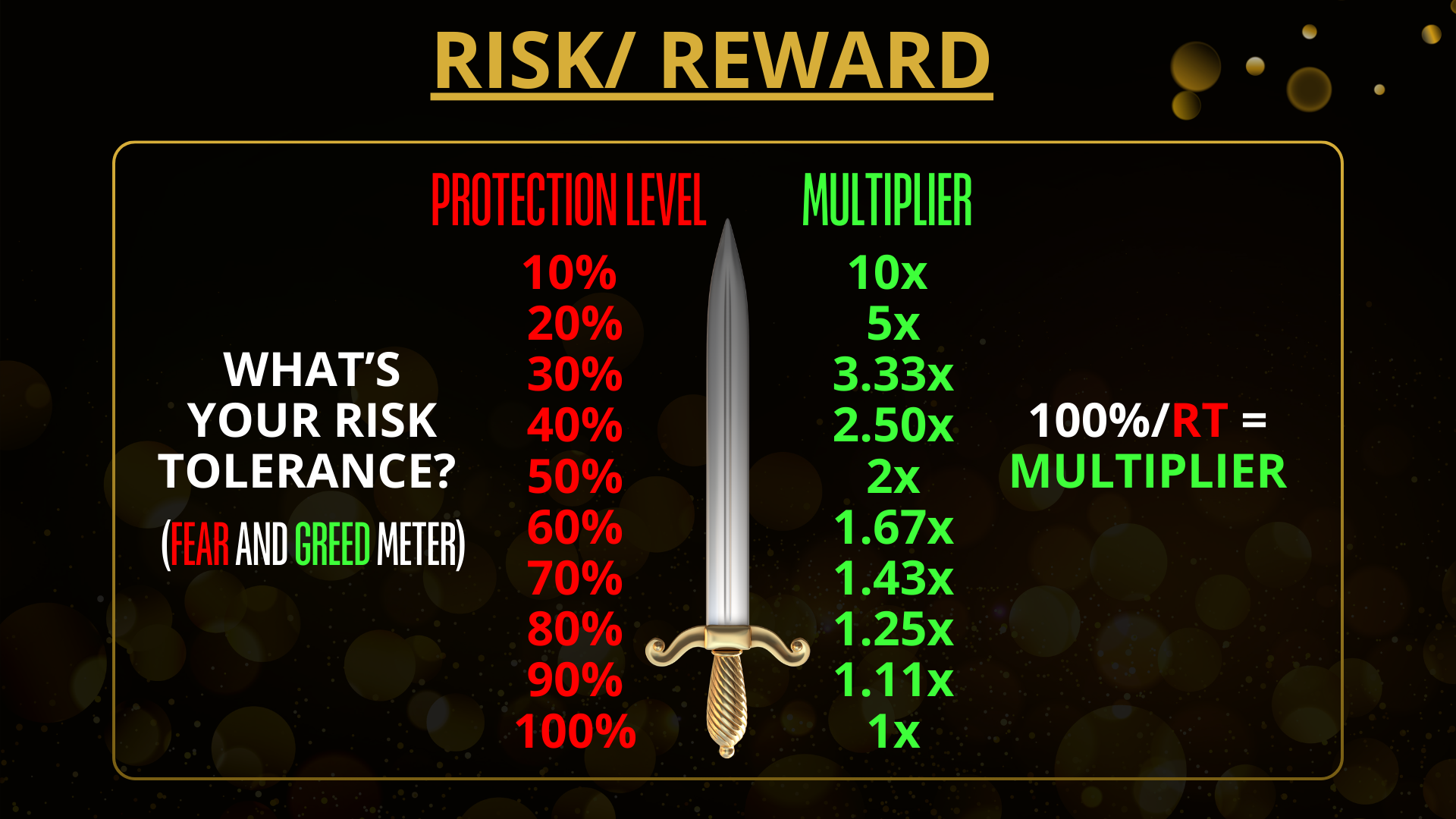
📐 Key Formulas
Use these to cross-check your calculator results.
Before You Configure Your EA…
These 5 concepts separate traders who last from those who don't. Prove you know them to unlock your calculator.
Before you configure your EA, you need to understand 5 key concepts — because this is what separates traders who last from those who don't.
- 📊 Lot Size — how trade size connects to your balance
- ⚡ GAP (Leverage) — your safety range and what it means
- 📉 DCA Zone — how the EA manages trades as gold drops
- �️ Protection Level — your price floor and why knowing it matters
- 💰 Top Up — the right move when gold gets close to your floor
Configure Your EA Settings
These settings control how Retirement EA trades your account. Use the defaults recommended by EA Nation, or customise based on your balance.
⚡ Recommended Default Settings
| Protection Level | 30% (3.3× multiplier) |
| DCA Zone | 20% |
| Max Orders | 40 |
You're Almost There!
Fill in your details below. We'll use this to install Retirement EA on your account and send you everything you need.
You're In!
Your information has been submitted. The final step is to message us on Facebook Messenger so we can install Retirement EA on your account.
📋 Step 1 — Copy this message
Add your MT5 Trading Password at the bottom, then send it to us.
📩 Step 2 — Send it to EA Nation
Tap Open Messenger — your message is already pre-filled. Just add your MT5 Trading Password and hit send!
💬 Open MessengerCan't open Messenger? Copy the message above and send it on our Facebook page:
Open EA Nation on FacebookWhat happens next:
- Our team will verify your account details
- Retirement EA will be installed on your MT5 account
- You'll receive a confirmation message within 24 hours
- The EA will start trading automatically once active
Already sent your message? Explore what EA Nation has to offer.
🌐 Go to EA Nation Website⚠️ Risk Disclosure & Disclaimer
Forex and CFD trading involves substantial risk of loss and is not suitable for all investors. The high degree of leverage can work against you as well as for you. Before deciding to trade, carefully consider your investment objectives, level of experience, and risk appetite. You could sustain a loss of some or all of your initial investment and therefore you should not invest money that you cannot afford to lose.EA Nation does not manage your funds. All trading activity is performed through your personal VT Markets account. Past performance of any trading system is not necessarily indicative of future results. EA Nation does not provide investment advice.
VT Markets is authorised and regulated by ASIC (Australia), FSCA (South Africa), and FSC (Mauritius).